Summary
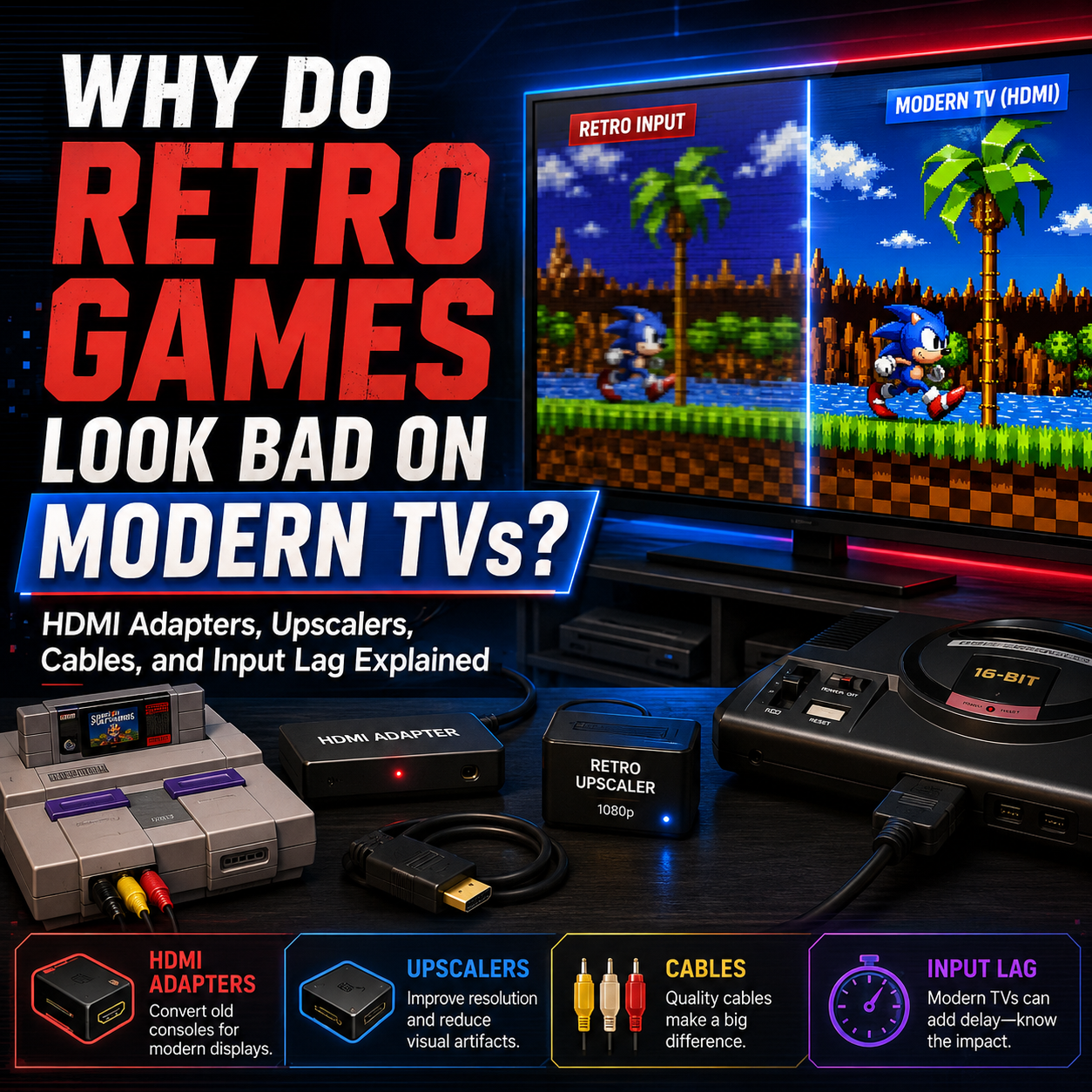
Retro games often look worse on modern TVs because old consoles were designed for CRT televisions, not flat-screen HDTVs or 4K displays. Systems like the NES, Super Nintendo, Nintendo 64, Sega Genesis, PlayStation 1, PlayStation 2, Sega Saturn, Dreamcast, GameCube, Original Xbox, Wii, and TurboGrafx-16 usually output low-resolution analog video signals such as RF, composite, S-Video, component, 240p, 480i, or 480p. Modern TVs are built around digital HDMI signals and higher resolutions, so they have to convert, scale, and process those old signals before displaying them.
That conversion process is where things can get ugly. The picture may look blurry, muddy, stretched, jagged, dark, washed out, delayed, or unstable. Some TVs handle retro signals reasonably well. Others treat them like alien transmissions from a cursed basement.
The good news is that you do not always need expensive console modifications to get a better picture. Power Up Gaming does not perform major video mods or high-end HDMI upgrades, but we do carry practical plug-and-play options for many retro consoles, including Hyperkin HD cables for systems like Original Xbox, GameCube/N64/SNES, Dreamcast, PSP 2000/3000, Saturn, Genesis, Wii, PS1/PS2, and TurboGrafx-16. We also carry AV to HDMI converter adapters, plus a selection of S-Video and component cables for different systems.
This guide explains why retro games look bad on modern TVs, what cable types actually do, when cheap HDMI adapters are good enough, when they are not, what input lag means, and how to choose a setup that fits your console, TV, budget, and expectations.

Why Old Consoles Were Not Built for Modern TVs
When most classic consoles were released, they were designed for CRT televisions.
CRT TVs handle old console signals in a way modern flat panels usually do not. A CRT is naturally suited to lower-resolution analog video. It does not need to scale an NES or SNES image to 1080p or 4K. It does not need to digitally deinterlace a PS2 signal. It does not need to guess what to do with 240p. It just displays the signal in a way that feels immediate and natural.
Modern TVs work differently. They are fixed-pixel digital displays. A 4K TV has a grid of pixels, and everything you feed it has to be converted to fit that grid. If the console sends a fuzzy composite signal, the TV still has to turn that into a digital image. If the console sends 240p, the TV may misread it as 480i. If the console sends 480i, the TV has to deinterlace it. If the TV is not good at any of that, the result can look rough.
This is why an old console might have looked fine on your childhood TV but looks awful now. The console did not necessarily get worse. The display changed.
The Big Problem: Modern TVs Are Too Honest and Too Dumb at the Same Time
Modern TVs are incredible for modern content. 4K movies, streaming apps, current consoles, and Blu-ray content can look fantastic. But retro consoles are weird little creatures.
Common modern TV problems include:
Blurry image scaling
Bad deinterlacing
Wrong aspect ratio
Washed-out colours
Input lag
Flickering
No signal
Over-sharpening
Crushed blacks
Jagged edges
Poor handling of 240p
Composite video looking extremely muddy
Stretching 4:3 games to widescreen
Some TVs do a decent job. Some are terrible. Some newer TVs do not even have analog inputs anymore, which means you need some kind of converter just to plug the console in. That is where cables, adapters, converters, and upscalers come in.

Retro Video Signals Explained in Plain English
Before picking a cable, it helps to understand the basic signal types. Just enough to stop the cable goblins from winning.
RF: The Worst Common Option
RF is the old screw-in coaxial connection that often connected through channel 3 or 4. This was common for systems like Atari 2600, NES, Sega Master System, Sega Genesis, Super Nintendo, Nintendo 64, and older home consoles in general.
RF carries video and audio together in one signal. It was convenient in the 80s and 90s, but it is usually the worst picture option today. RF can look fuzzy, noisy, washed out, unstable, full of interference, and soft around text and edges.
Composite Video: The Yellow Cable Most People Remember
Composite video is the classic yellow video cable paired with red and white audio cables. Composite is better than RF because it separates video from audio, but it still combines colour and brightness into one video signal. That means the image can look soft, smeary, and noisy.
On a CRT, composite often looked acceptable because CRTs naturally softened the image. On a modern TV, composite can look rough because the TV exposes all the mess and then scales it up.
S-Video: The Underrated Upgrade
S-Video separates brightness and colour better than composite, which often gives a cleaner image. It can improve colour clarity, text readability, edge definition, dot crawl, rainbow artifacts, and general sharpness.
Not every console supports S-Video, and not every modern TV has S-Video input. But for consoles that support it, S-Video is often a great middle-ground option. Power Up Gaming carries a selection of S-Video cables for different consoles when available.
Component Video: A Big Step Up for Supported Consoles
Component video uses red, green, and blue video connectors, usually with separate red and white audio. It is a major step up from composite for systems that support it, including PlayStation 2, Wii, Original Xbox, some GameCube models, PSP 2000/3000, and later-generation analog-capable consoles.
Wii is a great example. Component cables can allow 480p output on compatible games and displays, and comparison testing from the Wii era showed component video could produce crisper text and more defined colours than composite when paired with the right settings. (WIRED)
Power Up Gaming carries a selection of component cables for different consoles when available. For many customers, component is one of the best practical upgrades before getting into expensive scaler setups.
RGB, SCART, and High-End Video Paths
RGB is one of the cleanest analog signals many older consoles can output, and SCART was common in Europe. However, RGB/SCART setups are usually more enthusiast-focused in Canada. They often require specific cables, compatible scalers, transcoders, or displays.
Power Up Gaming does not focus on major console video modifications or high-end RGB/HDMI mod work. We can still help customers with practical cable options, but boutique RGB mods, internal HDMI mods, or a full enthusiast upscaler chain become a more specialized project.

HDMI Cables for Retro Consoles: What They Actually Do
A lot of modern retro gaming cables are sold as HD cables or HDMI cables. These usually do some kind of analog-to-digital conversion. They take the signal from the console and output HDMI so you can plug into a modern TV.
Power Up Gaming carries Hyperkin HD cables for several retro consoles, including:
Original Xbox
GameCube / N64 / SNES
Dreamcast
PSP 2000 / 3000
Sega Saturn
Sega Genesis
Wii
PS1 / PS2
TurboGrafx-16
These are practical plug-and-play options for people who want to connect old consoles to modern TVs without building a high-end video setup.
An HDMI cable does not magically turn a retro console into a modern HD system. If the console outputs a soft signal, the cable can only do so much. Some HDMI cables improve convenience more than image quality. Some look surprisingly decent for the price. Some are good enough for casual play. But they are not the same as a premium upscaler or an internal HDMI mod.
AV to HDMI Converter Adapters: Good Enough or Garbage?
AV to HDMI converter adapters are one of the most common ways people connect old consoles to modern TVs. These usually accept composite AV input, the yellow, red, and white cables, then output HDMI.
They are affordable, simple, easy to find, compatible with many systems, and good enough to get a picture on most modern TVs. Power Up Gaming carries AV to HDMI converter adapters because they solve a very real problem: many people just need their old console to show up on a modern TV.
However, basic AV to HDMI converters are not high-end upscalers. They may introduce extra lag, soft image quality, washed-out colour, incorrect aspect ratio, flicker, poor handling of 240p, image noise, stretching, or occasional compatibility issues.
Upscalers: The Better Way to Handle Retro Signals
A proper retro gaming upscaler is designed to understand old game signals and convert them cleanly for modern displays. High-end video processors can handle 240p correctly, 480i deinterlacing, 480p passthrough or scaling, low-lag output, better sharpness, aspect ratio control, scanline filters, CRT-style effects, multiple analog inputs, and output to HDMI.
RetroTINK describes its video processors as tools designed to connect classic consoles with modern displays, with support for analog and digital inputs depending on model, built-in profiles, and scaling features designed specifically for game content. (RetroTINK)
Power Up Gaming does not currently carry or offer the higher-end HDMI solutions, premium scalers, or internal console modifications. But it is still useful to understand the difference between basic adapters, Hyperkin-style cables, component/S-Video, dedicated scalers, and internal HDMI mods.
Why 240p Confuses Modern TVs
Many older consoles output 240p for most games, including NES, SNES, Sega Genesis, TurboGrafx-16, Nintendo 64, PlayStation 1, and Sega Saturn.
Many modern TVs and cheap converters misinterpret 240p as 480i, which can cause bad processing, flicker, deinterlacing artifacts, or delay. HD Retrovision’s FAQ explains that its component cables pass through the original signal timing from the console, meaning 240p stays 240p and 480i stays 480i, rather than being upconverted or scaled by the cable itself. It also notes that some TVs and displays do not properly accept 240p over component video. (HD Retrovision)
A cable is not always an upscaler. Sometimes the cable simply carries the signal better. Your TV still has to know what to do with it.
480i, 480p, and Why Interlacing Matters
A lot of sixth-generation consoles commonly output 480i, including PlayStation 2, GameCube, Original Xbox, Wii, Dreamcast for some setups, and some later consoles and games.
480i is interlaced video. CRTs handled this naturally. Modern TVs have to deinterlace it, which can cause jitter, flickering lines, delay, blurry motion, combing artifacts, soft text, and general ugliness.
480p is progressive scan and usually looks cleaner on modern displays. Some consoles and games support 480p, but not all of them. Wii, Original Xbox, GameCube with the right setup, Dreamcast VGA/HDMI-style solutions, and select PS2 games can benefit from progressive output.

Input Lag Explained
Input lag is the delay between pressing a button and seeing the action happen on screen. Retro games were designed around low-lag displays. A CRT responds very quickly. Modern TVs process the image before displaying it, and that processing can add delay.
To reduce lag, turn on Game Mode, disable motion smoothing, avoid unnecessary processing, use better cables where possible, use a decent converter or scaler, keep the signal chain simple, and use wired controllers when possible.
Why Some Retro Games Look Too Sharp
Sometimes retro games look bad because they are too blurry. Other times they look bad because they are too sharp. Pixel art was often designed with CRT softness in mind. Developers used dithering, scanlines, composite blending, and CRT quirks as part of the visual effect.
Some people want the cleanest possible pixels. Some want the childhood TV look. Some just want the game to work. The best setup depends on what you value.
Aspect Ratio: Stop Stretching Mario
Most retro games were designed for 4:3 displays. Modern TVs are usually 16:9 widescreen. If your TV stretches a 4:3 game to fill the screen, everything becomes wider than intended.
Before buying more cables, check your TV settings. Look for aspect ratio, picture size, 4:3, original, normal, just scan, screen fit, and game mode. Set retro consoles to 4:3 whenever possible.
Why NES, SNES, Genesis, and TurboGrafx-16 Look Different on Modern TVs
These systems are mostly 240p-era machines. They were designed for CRTs and often used lower-resolution analog video. Their best practical options depend on the console and cable availability.
NES
The original NES typically outputs RF or composite unless modified. Composite is usually the most practical option for most customers. On modern TVs, NES composite can look soft and noisy, but it is often playable with an AV to HDMI converter.
Super Nintendo
The SNES can look quite good with the right cable. Composite is common, S-Video is a nice upgrade, and some setups can use component-style solutions depending on cable type and console compatibility. Power Up Gaming carries Hyperkin HD cables for GameCube/N64/SNES, making HDMI connection much easier for many modern TVs.
Sega Genesis
Genesis video quality varies by model and cable. Some Genesis models output cleaner video than others. Composite can look noisy. Better cables can help. Power Up Gaming carries Hyperkin HD cables for Genesis, which are a practical plug-and-play option for modern TVs.
TurboGrafx-16
TurboGrafx-16 video options can be more niche. Depending on setup, customers may be dealing with RF, composite, or specialty cables. Power Up Gaming carries Hyperkin HD cables for TurboGrafx-16, which can make modern TV hookup easier for people who do not want to build a custom setup.

Why Nintendo 64 Looks So Blurry on Modern TVs
The Nintendo 64 is famous for looking blurry. The N64 used filtering and anti-aliasing that made games look smoother on CRTs but softer on modern displays. Add composite video and poor modern TV scaling, and the result can be mushy.
For practical customer-friendly options, Power Up Gaming carries Hyperkin HD cables for GameCube/N64/SNES, and AV to HDMI converters for basic connection needs. These can help customers connect the system easily, but expectations matter: an N64 may still look like an N64.
Why PlayStation 1 Looks Rough on Modern TVs
The PlayStation 1 often outputs 240p in gameplay and 480i in some menus or select situations. That can confuse modern TVs and cheap converters. Composite can look nostalgic but messy. S-Video or better cables can help if your setup supports them. Power Up Gaming carries Hyperkin HD cables for PS1/PS2, which can be a practical plug-and-play option.

Why PlayStation 2 Can Be So Tricky
The PS2 might be the most confusing retro console for modern TVs. Many PS2 games output 480i, and modern TVs do not always deinterlace 480i well. Some PS2 games support 480p, but many do not.
Power Up Gaming carries Hyperkin HD cables for PS1/PS2 and may also carry component cables depending on availability. Both can be useful, but results vary by game, TV, and settings.
Why GameCube Can Look Great, But Gets Complicated
GameCube video quality depends heavily on the model and cable. Some GameCube systems have a digital AV out port, while later models removed it. The original official component cables are expensive and hard to find. Modern alternatives exist, but the best solutions can get pricey.
Power Up Gaming carries Hyperkin HD cables for GameCube/N64/SNES, which provide a practical HDMI option for customers who want a simpler setup.
Why Original Xbox Usually Handles Modern TVs Better
The Original Xbox is often friendlier to modern displays than earlier systems because many games support 480p, and some support higher resolutions depending on region and setup. Power Up Gaming carries Hyperkin HD cables for Original Xbox, which makes it easier to connect to modern TVs through HDMI.
Why Dreamcast Still Has a Reputation for Clean Video
The Dreamcast is loved by video nerds because it can output a very clean image through VGA-style video on compatible games and setups. Many Dreamcast games support 480p VGA output, which can look excellent compared to composite or RF-era systems. Power Up Gaming carries Hyperkin HD cables for Dreamcast.
Why Saturn Is More Complicated
The Sega Saturn is mostly a 240p/480i-era machine, and it can be picky depending on the game and display. S-Video can be a nice upgrade. RGB is popular with enthusiasts, but that can push into more specialized setups. Power Up Gaming carries Hyperkin HD cables for Saturn.
Why Wii Looks Better With Better Cables
The Wii is one of the easiest practical upgrades. Composite Wii looks okay, but component Wii is much better. With component cables and the right TV settings, the Wii can output 480p, which is cleaner and better suited to modern displays than 480i composite.
Why PSP 2000 and 3000 Need Specific Cables
The PSP 2000 and PSP 3000 can output video to a TV, but they require the right cables. Power Up Gaming carries Hyperkin HD cables for PSP 2000/3000, which can help customers connect compatible PSP models to HDMI displays more easily.
Quick Cable Quality Ranking
This is not universal for every console, but as a general guide:
RF: usually worst
Composite: common, convenient, soft
S-Video: cleaner than composite when supported
Component: strong upgrade for supported consoles
VGA / RGB / SCART: excellent in the right setup, more enthusiast-focused
Plug-and-play HDMI cables: convenient and practical, quality varies
Dedicated retro upscalers: better processing, higher cost
Internal HDMI mods: premium enthusiast solution, system-specific
Power Up Gaming focuses mainly on practical options like Hyperkin HD cables, AV to HDMI converters, S-Video, and component cables, rather than internal video mods or high-end scaler setups.
Console-by-Console Practical Recommendation Chart
| Console | Common Basic Output | Better Practical Option | Power Up Gaming Notes |
|---|---|---|---|
| Atari 2600 | RF | AV mod or converter if modified | We do not offer major video mods. |
| NES | RF / composite | Composite to HDMI converter | Major HDMI mods are outside our normal offering. |
| SNES | Composite | S-Video or Hyperkin HD cable | Hyperkin HD cable available for GameCube/N64/SNES. |
| Nintendo 64 | Composite | S-Video or Hyperkin HD cable | N64 will still look soft compared to newer systems. |
| GameCube | Composite | Hyperkin HD cable / component-style solutions | Results depend on model and cable. |
| Wii | Composite | Component or Hyperkin HD cable | 480p settings can matter. |
| Wii U | HDMI | HDMI | Already modern-TV friendly. |
| Sega Genesis | Composite | Hyperkin HD cable / better AV cables | Model differences can affect video quality. |
| Sega Saturn | Composite | S-Video or Hyperkin HD cable | Saturn can benefit from better cables. |
| Dreamcast | Composite | Hyperkin HD cable / VGA-style options | Dreamcast can look very clean with the right setup. |
| TurboGrafx-16 | RF / composite depending setup | Hyperkin HD cable | Hyperkin HD cable available. |
| PlayStation 1 | Composite | S-Video or Hyperkin HD cable | 240p handling can be an issue. |
| PlayStation 2 | Composite | Component or Hyperkin HD cable | Many games are still 480i. |
| Original Xbox | Composite / component | Hyperkin HD cable / component | Often one of the better-looking older systems. |
| Xbox 360 | HDMI / component | HDMI | Modern-TV friendly. |
| PSP 2000/3000 | PSP AV/component-style out | Hyperkin HD cable | Model compatibility matters. |
Cheap Adapter vs Better Cable vs Upscaler: Which Should You Buy?
Choose an AV to HDMI converter if:
You just want the console to work
You are on a budget
You are using composite cables
You are not picky about perfect picture quality
You are setting up casual play
Your TV has no AV inputs
Choose a Hyperkin HD cable if:
You want a simple HDMI connection
You want fewer boxes and cables
Your console is supported
You want a practical modern-TV solution
You are not chasing perfection
You want something Power Up Gaming carries and can help you choose
Choose S-Video or component if:
Your console supports it
Your TV or converter supports it
You want better analog quality
You want to avoid the worst composite blur
You are okay with a slightly more cable-specific setup
Choose a dedicated retro upscaler if:
You are serious about image quality
You play a lot of retro games
You care about input lag
You want better 240p handling
You want scanline or CRT-style options
You are willing to spend more
Choose an internal HDMI mod if:
You are an enthusiast
You want a premium system-specific solution
You understand the cost
You are comfortable using a modded console
You are working with a specialist installer
Power Up Gaming can help with the first three categories. The last two are more specialized enthusiast territory.
Common Mistakes People Make
Mistake 1: Assuming HDMI always means better
HDMI is convenient, but the quality depends on the conversion. A cheap HDMI adapter can still produce a soft or laggy image.
Mistake 2: Stretching the image to widescreen
Most retro games should be played in 4:3.
Mistake 3: Forgetting Game Mode
Game Mode can reduce input lag on modern TVs.
Mistake 4: Using the wrong cable for the wrong console
Just because a cable fits does not mean it is ideal or safe. This matters especially with power supplies, but AV cables can also have compatibility differences.
Mistake 5: Expecting N64 to look razor-sharp
The N64 is naturally soft. Better cables can help, but they do not completely change the console’s visual character.
Mistake 6: Thinking component means HD
Component can carry better video, including 480p on some systems, but it does not automatically make every retro game HD. HD Retrovision’s FAQ explains that component cables can pass through the console’s original signal timing rather than upscaling it. (HD Retrovision)
Mistake 7: Buying expensive gear before checking TV settings
Sometimes the TV is simply set wrong. Check aspect ratio, Game Mode, picture processing, and console video settings first.
Power Up Gaming’s Practical Advice
At Power Up Gaming, we are not going to tell every customer they need a $300 to $1000 video setup to play retro games. Some people do. Most people do not.
If you are a serious collector, streamer, speedrunner, or image-quality nerd, high-end scalers and HDMI mods may be worth researching. But if you are a normal customer who wants to plug in a retro console and enjoy it on a modern TV, there are more practical paths.
Power Up Gaming carries Hyperkin HD cables for Original Xbox, GameCube / N64 / SNES, Dreamcast, PSP 2000 / 3000, Sega Saturn, Sega Genesis, Wii, PS1 / PS2, and TurboGrafx-16. We also carry AV to HDMI converter adapters and a selection of S-Video and component cables for different consoles.
We can help customers choose a practical setup based on what console they own, what TV they are using, and how picky they are about picture quality. Some people want “the best.” Some people want “good enough.” Some people just want GoldenEye to show up on the living room TV before their friends arrive. All three are valid.

Should You Use a CRT Instead?
Honestly? Sometimes, yes.
A good CRT is still one of the best ways to play many retro consoles. It handles old signals naturally, has very low lag, displays 4:3 correctly, and gives games the look they were designed around.
CRT benefits include low input lag, natural 240p support, great motion clarity, proper 4:3 display, authentic look, and composite or S-Video that often looks better than expected. Downsides include weight, bulk, aging hardware, limited space, geometry issues, no HDMI, and the fact that they are not practical for everyone.
For a dedicated game room, a CRT can be amazing. For most living rooms, an HDMI solution is more realistic.

Final Thoughts
Retro games look bad on modern TVs because old consoles and new displays were not really built for each other.
The console may be sending RF, composite, S-Video, component, 240p, 480i, or 480p. Your modern TV wants clean digital HDMI. Somewhere between those two worlds, the signal has to be converted, scaled, processed, and displayed. That is where blur, lag, stretching, flicker, and weirdness can happen.
The best solution depends on your console, your TV, your budget, and your expectations.
You do not always need expensive mods. You do not always need a high-end scaler. But you do need the right cable path and realistic expectations.
Power Up Gaming can help with practical, customer-friendly options like Hyperkin HD cables, AV to HDMI converter adapters, S-Video cables, and component cables for many retro consoles. We do not offer major internal HDMI modifications or premium scaler installations, but we can help you get your old consoles connected and playable without turning your living room into a NASA control room.
Retro games are supposed to be fun. They should not require a degree in signal processing just to play Donkey Kong Country.

FAQ
Why do retro games look bad on modern TVs?
Retro games often look bad on modern TVs because old consoles were designed for CRT televisions and output low-resolution analog video. Modern TVs have to convert and scale those old signals, and some TVs handle that poorly.
Why does my Nintendo 64 look so blurry on my HDTV?
The N64 is naturally soft because of its video output and internal filtering. Composite video and poor modern TV scaling can make it look even blurrier. Better cables can help, but the N64 will usually still look softer than many other consoles.
Is RF worse than composite?
Usually, yes. RF combines audio and video into a single signal and is often fuzzy or noisy. Composite is usually better, though still soft compared to S-Video or component.
Is S-Video better than composite?
Yes, S-Video usually produces a cleaner image than composite because it separates brightness and colour better. It can improve sharpness, colour clarity, and text readability.
Is component better than composite?
Yes, component video is usually much better than composite on supported consoles. It can provide cleaner colour, sharper image quality, and sometimes 480p output depending on the system and game.
Does HDMI automatically make retro games look better?
No. HDMI makes it easier to connect to a modern TV, but the quality depends on how the signal is converted. A basic HDMI adapter may be convenient but not perfect.
Are Hyperkin HD cables good for retro consoles?
Hyperkin HD cables are practical plug-and-play options for many retro consoles. They are a good choice for customers who want an easy HDMI connection without expensive mods or high-end scaler setups. They are not the same as premium internal HDMI mods or dedicated retro upscalers.
Does Power Up Gaming sell retro HDMI cables?
Yes. Power Up Gaming carries Hyperkin HD cables for several retro consoles, including Original Xbox, GameCube/N64/SNES, Dreamcast, PSP 2000/3000, Sega Saturn, Sega Genesis, Wii, PS1/PS2, and TurboGrafx-16.
Does Power Up Gaming sell AV to HDMI converters?
Yes. Power Up Gaming carries AV to HDMI converter adapters, which are useful for connecting composite AV consoles to modern HDMI TVs.
Does Power Up Gaming do HDMI mods?
No. Power Up Gaming does not currently perform major internal HDMI modifications or high-end console video mods. We focus on practical plug-and-play cable solutions, AV to HDMI converters, S-Video, and component cable options.
What is 240p?
240p is a low-resolution progressive video signal used by many older game consoles. Some modern TVs and cheap converters handle it poorly or mistake it for 480i.
What is 480i?
480i is an interlaced video signal common on consoles like PS2, GameCube, Xbox, and Wii. Modern TVs need to deinterlace it, which can add blur, artifacts, or lag.
What is 480p?
480p is progressive scan video. It is usually cleaner and better suited to modern displays than 480i. Some consoles and games support it, especially Wii, Original Xbox, Dreamcast, and select PS2/GameCube titles.
Why does my PS2 look bad on a modern TV?
Many PS2 games output 480i, and modern TVs do not always deinterlace 480i well. Better cables can help, but results depend on the game, TV, settings, and adapter.
Why does my Wii look better with component cables?
Component cables can allow the Wii to output 480p on compatible displays, producing a cleaner image than composite. You may need to change the Wii’s video settings to get the best result.
Should I use 4:3 or widescreen for retro games?
Most retro games should be played in 4:3. Stretching them to widescreen makes the image look distorted.
What is input lag?
Input lag is the delay between pressing a button and seeing the action on screen. Modern TVs, converters, and video processing can all add lag.
How can I reduce input lag?
Turn on Game Mode, disable motion smoothing, use a better cable or converter, keep the signal chain simple, and use wired controllers where possible.
Are CRT TVs still good for retro games?
Yes. CRT TVs are still excellent for many retro consoles because they handle old analog signals naturally, have low lag, and display 4:3 games properly. The downside is that CRTs are heavy, bulky, and harder to find in good condition.
What is the easiest way to connect an old console to a modern TV?
The easiest option is usually a console-specific HDMI cable, like the Hyperkin HD cables Power Up Gaming carries, or an AV to HDMI converter if you are using standard composite cables.
What is the best option for serious collectors?
Serious collectors may want to research dedicated retro upscalers, RGB/component setups, or internal HDMI mods. These can produce excellent results, but they are more expensive and more complicated than the practical plug-and-play options Power Up Gaming normally offers.